
Where do I find my Takealot Seller API key?
What are API keys and how do they work?
- API keys allow external applications such as Palmetrics to read and write data to your Takealot account.
- You can only have one API key on Takealot at a time per account.
- Only the owner of a Takealot Seller account can generate an API key.
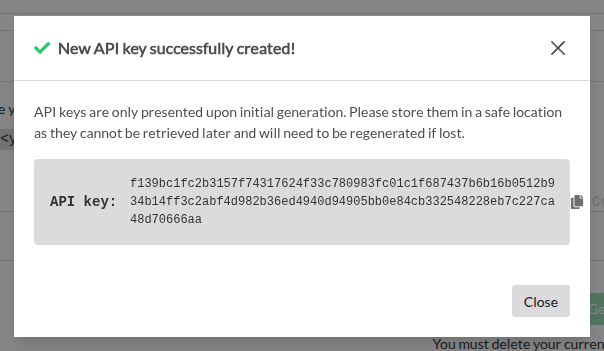
- Takealot only shows you the API key once when you generate it, and expects you to save this somewhere safe for future usage.
- If you delete an API key, any applications using that API key will no longer be able to connect to your Takealot account.
Open Takealot Seller Portal
- Log into your Takealot Seller Portal account
- Click on the "API Integration > Seller API" tab in the bottom left
- Look for the "Authentication" section shown in the screenshot below
"No active keys"
If you see "No active keys" like this:
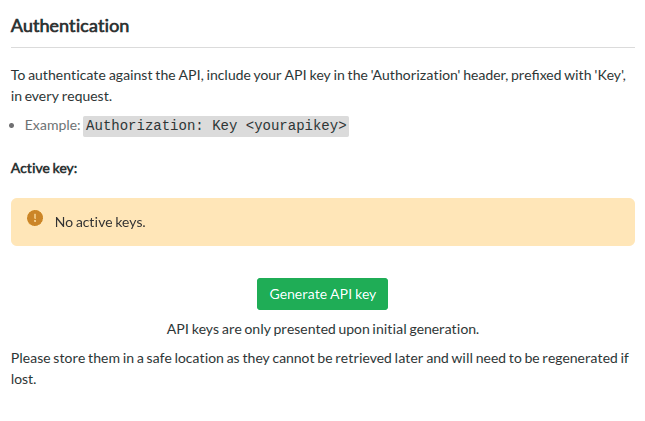
Then you can create a new API key.
Click "Generate API Key" and then copy the long value next to "API key" (in the screenshot below, that value is f139bc1fc2b3157f74317624f33c780983fc01c1f687437b6b16b0512b934b14ff3c2abf4d982b36ed4940d94905bb0e84cb332548228eb7c227ca48d70666aa)
Existing API key
If you see "Key #1" like this:
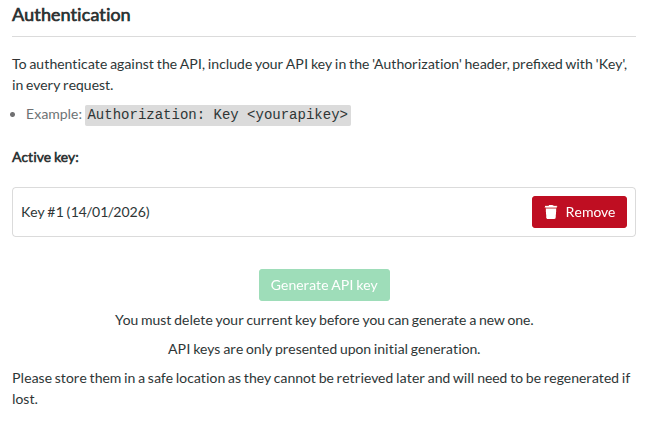
This means that an API key has already been created in the past for this account.
You have two options:
- find the API key wherever you or the account owner saved it when you initially created it
- delete the current API key and generate a new one (continue reading below)
Delete the current API key and generate a new one
WARNING
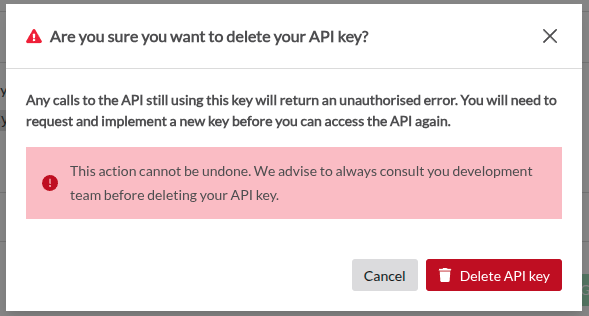
Deleting an API key will revoke access to any applications that rely on it to connect to your Takealot account. You will need to update those applications with the new key if you want them to continue working.
- Click the red "Remove" button next to the old key
- Read the warning and if you want to proceed, click "Delete API key"
- Continue from the "No active keys" section to generate a new key.